
Tag: Core Web Vitals

  • From the Field: Agentic Browsing Is the Weakest Score We’re Seeing

    From the Field: Agentic Browsing Is the Weakest Score We’re Seeing

    Agentic Browsing is still early, but we are starting to see a clear pattern in the websites we test.

    At ONIK, we monitor websites across several areas, including uptime, response time, performance, accessibility, SEO, best practices, and Agentic Browsing. That gives us a useful view into how websites are performing beyond a one-time audit or a single page speed test.

    We have already written about what Agentic Browsing is, why Google Lighthouse now checks for it, and why it may push accessibility standards forward. This article is a little different. This one is about what we are seeing in the field.

    Across the thousands of URLs monitored in ONIK, we reviewed the 7-day average Agentic Browsing scores to better understand how prepared websites are for AI agents and automated browsers. The results showed a clear gap.

    The average Agentic Browsing score was only 40.7/100.

    That gap is the story and also represents the biggest opportunity. It suggests that many websites may look fine through traditional testing, but still may not be easy for AI agents or automated browsers to understand, navigate, or interact with confidently.

    Why this matters now

    AI traffic is already here, and it is on the rise.

    Cloudflare reported that AI crawlers represented about 20% of Verified Bot traffic in 2025, while search engine crawlers represented about 40%. Cloudflare also reported sustained growth in ChatGPT-User traffic, which is generated when ChatGPT visits pages in response to user requests.

    Imperva reported that automated traffic surpassed human traffic in 2024, accounting for 51% of all web traffic, with bad bots making up 37%.

    HUMAN Security reported that monthly AI-driven traffic grew 187% from January to December 2025, while traffic from AI agents and agentic browsers grew 7,851% year over year.

    Those numbers are not all measuring the exact same thing. A crawler collecting content is different from an AI agent trying to complete a form, compare vendors, book an appointment, or check out on behalf of a user. But that distinction is exactly why this matters.

    The web is not only being indexed anymore. It is increasingly being interpreted, summarized, navigated, and acted on by software. As that shift continues, website readiness will need to include more than speed, uptime, and traditional accessibility checks. It will also need to include whether an agent can understand what a page is, what actions are available, and how to complete them reliably.

    What Agentic Browsing can do for a visitor

    When people hear “AI agents,” it can sound abstract. But on a website, the use cases are practical.

    An agent may read a site to find information, answer a question, or collect key details for a user. That could mean finding pricing, comparing service options, checking availability, summarizing a policy, or pulling together key information from a long page.

    It may also complete simple interactions. An agent could use a search field, fill out a contact form, submit an expression of interest, or help a visitor find the right next step.

    Over time, those interactions may become more complex. Agents may help users register for events, configure a service, purchase a product, submit a support ticket, update account information, or complete a multi-step workflow.

    For that to work well, the website needs to provide more than content. It needs structure. It needs clear labels, predictable actions, understandable forms, and pages that communicate meaning in a way software can interpret.

    That is where many websites are not ready yet.

    The weakest category was Agentic Browsing
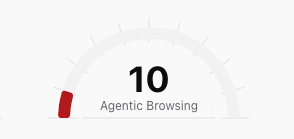
    Speedometer chart of an actual agentic browsing score in ONIK.

    Across the thousands of URLs we reviewed, Agentic Browsing was the weakest category by a wide margin.

    The average Agentic Browsing score was just 40.7. Looking deeper into the sample, over 70% of URLs tested had an Agentic Browsing score below 50. About two-thirds scored poorly, below 40, while less than 10% scored 70 or higher.

    This does not mean those websites are broken. It does not mean they are slow. It does not mean they are unusable. It means that, when evaluated through an Agentic Browsing lens, many pages are not providing enough structure, clarity, or machine-readable context for agents to understand and interact with them confidently.

    That is not especially surprising. Agentic Browsing is a newer category. Standards like WebMCP and llms.txt are still emerging, and most websites were not built with agent-driven browsing in mind. Still, the size of the gap is meaningful.

    It shows that agent-readiness may become a separate layer of website quality, not something that can simply be assumed because a site already performs well elsewhere.

    Strong scores do not always mean agent-ready

    One of the more useful findings was that strong performance and accessibility scores did not always translate into strong Agentic Browsing scores.

    We saw many pages with strong performance scores, strong accessibility scores, or both, that still scored poorly for Agentic Browsing. That is probably the strongest takeaway from this review: a website can be fast, accessible, and still be poorly prepared for agent-driven interaction.

    That does not make the existing work less valuable. A fast, accessible website is still a better website. It simply shows that Agentic Browsing is adding a new layer to how website readiness should be evaluated.

    Performance, accessibility, and agent-readiness are connected, but they are not the same thing. A page can load quickly and still be difficult for an automated browser to interpret. It may have unclear buttons, weak labels, non-semantic page elements, confusing form structures, or interactions that rely heavily on visual context.

    We explored the connection between Agentic Browsing and accessibility in more detail in our earlier article on how Agentic Browsing may push accessibility standards forward. But the data shows the overlap is not complete. Agentic Browsing builds on performance and accessibility, while also exposing gaps those scores may not fully capture on their own.

    What this means for website owners

    For website owners and operators, this matters because AI agents are likely to become part of how users research services, compare options, complete forms, book appointments, make purchases, and interact with websites more generally.

    Gartner has projected that by 2028, 33% of enterprise software applications will include agentic AI, up from less than 1% in 2024. It also predicts that at least 15% of day-to-day work decisions will be made autonomously through agentic AI by 2028.

    That does not mean every website interaction is about to become agent-driven overnight. It does suggest that agents are moving from demos and experiments into the tools people use to get work done.

    As that happens, websites will increasingly need to be understandable not only to people, but also to the systems acting on their behalf.

    The practical takeaway is not that every website needs to chase every emerging AI standard immediately. The better starting point is to understand where your site may already be creating friction.

    Are key pages structured clearly? Are forms properly labeled? Are buttons and links understandable without relying only on visual context? Does the page make its purpose clear in the structure of the site, not just in the design? Can an automated browser understand what actions are available and what step should come next?

    These are not only agent questions. They are website quality questions. That is why we continue to come back to the idea that Agent-ready = Human-ready.

    Next Steps

    What we’re stoked about is making sites agent friendly ultimately makes them a better experience for humans. Here are some steps you can take to improve both.

  • Web Performance 101: Part 3

    Where Good Websites Go Wrong

    You’ve run the tests.
    You’ve seen the scores.
    You’ve maybe even improved a few things.

    And your site is still slow.

    This is the part nobody likes—because it’s not one fix. It’s the system.

    1. Your Images Are Out of Control

    Let’s stop pretending this isn’t the biggest issue on most sites.

    Images are typically 50–70% of your total page weight. And most of them are:

    • Too large
    • Poorly compressed
    • Loaded all at once
    • Uses old file format

    You don’t need a better developer.
    You need extreme discipline, or a tool to do it all for you.

    What needs to happen:

    • Serve images from a CDN, not your host or server
    • Resize images to actual display size on mobile or desktop (not “we’ll scale it in CSS”)
    • Compress aggressively
    • Serve modern formats (WebP/AVIF)
    • Lazy load everything below the fold

    Or… automate it entirely (this is literally what ONIK Lens exists to do).

    If you ignore this, nothing else matters.

    2. JavaScript Is Blocking Everything

    Here’s the uncomfortable truth: Your fancy site animations are probably hurting you more than helping you.

    Every script you add:

    • Delays rendering
    • Competes for bandwidth
    • Blocks the main thread

    Especially:

    • Third-party tools (chat widgets, trackers, A/B testing tools)
    • Bloated themes and page builders
    • “Nice-to-have” animations

    What to do:

    • Defer or delay non-critical JS
    • Remove anything that isn’t essential
    • Audit third-party scripts like they’re expenses (because they are)

    If it doesn’t directly drive revenue, it’s on the chopping block.

    3. Your Hosting Is Lying to You

    “Fast hosting” doesn’t mean your site is fast.

    It means:

    • Your server might respond quickly
    • Under ideal conditions
    • With minimal load on your site and your neighbours

    Real-world performance depends on:

    • Server configuration
    • Caching strategy
    • Geographic distribution
    • Traffic spikes
    • Quality and right sized web hosting

    Cheap hosting costs you more than you think—because it quietly kills the experience.

    What to do:

    • Use proper caching (page + object caching)
    • Add a CDN
    • Consider choosing a scalable hosting (serverless delivery instead of shared or single server VPS)

    If your Time to First Byte or Response Time is slow, everything else is already behind.

    4. You’re Loading Everything… Immediately

    Why is your site trying to load everything before showing anything?

    That’s not how fast sites behave.

    Modern performance is about prioritization:

    • Load what the user sees first
    • Delay everything else

    This includes:

    • Images
    • Scripts
    • Fonts
    • Videos

    What to do:

    • Implement lazy loading properly
    • Prioritize above-the-fold content
    • Use critical CSS

    Speed isn’t about less content.
    It’s about smarter delivery.

    5. You’re Guessing Instead of Monitoring

    Running a test once is not performance strategy.

    It’s a snapshot.
    And snapshots lie.

    Performance changes constantly:

    • Plugin updates
    • Content changes
    • Traffic spikes
    • Third-party scripts

    If you’re not monitoring, you’re flying blind.

    What to do:

    • Track performance over time
    • Set alerts for drops
    • Monitor real user experience (not just lab tests)

    This is exactly why ONIK Monitoring exists. Not for reports—for accountability.

    The Reality Check

    Most sites aren’t slow because of one big problem.

    They’re slow because of:

    • 10 small decisions
    • Made over time
    • With no oversight

    And those decisions stack.

    The Fix (If You’re Serious About It)

    Here’s the actual system:

    • Diagnose → Scorecard
    • Watch → Monitoring
    • Fix → Consulting
    • Optimize at scale → Lens
    • Deliver fast globally → Serverless

    Anything less is patchwork.

    In Part 4, we’ll connect the dots—between what’s slowing your site down and how it actually feels to use.

    Want a clear picture of your performance? Run your Scorecard.

  • Web Performance 101: Part 1

    The Hidden Business Risk No One on Your Team Is Monitoring

    Why most companies miss the problem until revenue or reputation takes the hit

    Most leadership teams believe they have a clear view of their biggest risks.

    They track revenue closely.
    They scrutinize costs.
    They monitor pipeline, churn, headcount, and growth.

    What they rarely monitor is how reliably their business actually shows up online.

    Not branding.
    Not campaigns.
    Not SEO rankings.

    But the day-to-day performance of the digital systems customers, partners, and prospects interact with every single day.

    That gap is where a quiet — and expensive — risk lives.

    The Risk That Doesn’t Trigger Alarms

    This risk doesn’t always announce itself.

    There’s no dramatic outage.
    No flood of angry emails.
    No obvious red flag in a dashboard.

    Instead, it shows up as:

    • Prospects leaving before converting
    • Leads feeling “weaker” than they used to
    • Customers losing confidence without knowing why
    • Teams sensing something is off, but lacking proof

    Because nothing is broken, no one escalates it.

    And because no one escalates it, the business absorbs the cost silently.

    Why Businesses Miss It

    Most organizations believe that if something were wrong, they’d know.

    They assume:

    • The site would go down
    • The dev team would flag it
    • Google would penalize it
    • A report would surface it

    But modern digital systems don’t fail loudly.

    They degrade.

    One image file at a time.
    One script failure at a time.
    One misconfiguration at a time.

    None of these trigger panic.
    All of them affect revenue and credibility.

    The Cost of “Everything Seems Fine”

    This is where the risk becomes dangerous.

    When performance issues stay invisible, businesses don’t just lose money — they lose clarity.

    Marketing teams debate messaging instead of experience.
    Sales teams blame lead quality.
    Product teams chase features.
    Leadership senses softness but can’t trace it.

    The problem isn’t effort.
    It’s visibility.

    When no one is watching the system, the business guesses.

    And guessing is expensive.

    The Big Reveal: It’s a Web Performance Problem

    The unmonitored risk most businesses carry is web performance.

    Not just speed.
    Not just SEO.
    Not just a one-time audit score.

    Web performance is how reliably your website loads, responds, and stays available for real users, in real conditions, over time.

    It’s the difference between:

    • A site that works in ideal conditions
    • And a site that works when traffic spikes, scripts fail, or configurations drift

    And because most teams only test occasionally — instead of observing continuously — performance problems surface after the damage is done.

    Why This Is a Business Issue (Not a Technical One)

    When web performance slips:

    • Revenue erodes quietly
    • Acquisition costs increase
    • Brand trust weakens
    • Internal teams lose confidence in their data

    No one puts “web performance risk” on a board slide.

    But its impact shows up everywhere else.

    The Most Dangerous Assumption

    The most common — and costly — assumption businesses make is this:

    “If there were a serious problem, we’d know.”

    In reality, the most damaging performance issues are the ones no one is watching.

    Because websites don’t fail dramatically.

    They fail quietly.

    And by the time the problem is obvious, revenue or reputation has already taken the hit.

    In Part 2, we’ll break down the four pillars that determine whether your website compounds value — or quietly undermines the business every day.

    Want to check your site performance now? Click here.